ShopShip Productivity Software FREE TO USE

PrintBot โ€” Smart
Layout & Crop Studio

The professional batch-image layout tool built by ShopShip for merchandise makers. Turn your photos into print-ready A4 sheets for magnets, keychains, badges, and frames โ€” in under 60 seconds. No design skills required.

๐ŸŽ
Free Demo Available โ€” No Account Needed
Try with up to 5 images instantly. Upgrade to a license for unlimited designs.
6
Shape Templates
50+
Images Per Batch
6
Image Filter Presets
Free
Demo Mode
PrintBot App Live Screenshot
Choose Your Canvas

6 Preset Shape Templates

Each preset is sized to match ShopShip blanks exactly โ€” so what you see on screen is what you get when you press.

โ—ฏ
Circle
58mm ยท 9/page
โ–ก
Square
50mm ยท 12/page
โ–ญ
Rectangle
90ร—65mm ยท 4/page
โ™ฅ
Heart
60mm ยท 12/page
โฌก
Hexagon
60mm ยท 12/page
โ˜…
Star
60mm ยท 12/page
โœ๏ธ
Custom Size Creator
Define your own dimensions with inner/outer sizes, custom radius, and margin controls โ€” go beyond presets for any shape you need.
Everything Included

Full Feature Breakdown

๐Ÿ“

Core Design Features

๐ŸŽฏ
6 Preset Shapes
Circle (58mm, 9/page), Square (50mm, 12/page), Rectangle (90ร—65mm, 4/page), Heart, Hexagon, Star (60mm, 12/page each).
๐Ÿ“
Custom Size Creator
Define custom dimensions with inner/outer sizes, radius, and margin controls for any unique project requirement.
๐Ÿ“ฆ
Batch Image Upload
Upload 50+ images at once via drag-and-drop. Supports JPG, PNG, and WEBP formats with real-time page count display.
โšก
Automatic Layout Packing
Smart algorithm arranges your images onto A4 pages with zero wasted space. Multi-page output generated automatically.
๐ŸŽจ

Image Editing & Customization

โœ‚๏ธ
Interactive Crop Editor
Precise cropping with zoom scale (1ร—โ€“3ร—), Offset X/Y panning controls. Drag the image to perfectly center your subject.
๐ŸŽž๏ธ
6 Filter Presets
Original, Vivid, B&W, Vintage, Soft, and Moody โ€” one-tap filter presets that give your designs a consistent professional look.
๐ŸŒˆ
Image Adjustments
Fine-tune Brightness, Contrast, and Saturation using live sliders. What you see is exactly what gets exported.
โš™๏ธ
Apply to All / Auto-Fit
Copy crop and filter settings across your entire batch in one click. Auto-Fit optimizes image positioning automatically.
๐Ÿ–จ๏ธ

Export & Print

๐Ÿ“„
Print-Ready A4 Layout
Export professional multi-page A4 print sheets ready for home printing or commercial print shops with all margins set correctly.
๐Ÿ–ผ๏ธ
Individual PNG Downloads
Export each cropped image as a separate high-resolution PNG file โ€” perfect for digital use or individual print orders.
๐Ÿ‘๏ธ
Live Page Preview
See a live A4 layout preview with zoom controls (0โ€“200%) before exporting. Optional boundary cutting guides overlay.
๐Ÿ”

Licensing & Access

๐Ÿ†“
Demo Mode โ€” Free
Trial with 5 image limit. No login, no account โ€” start immediately. Perfect to evaluate before purchase.
โœ…
License Activation
Server-validated license keys. One key = one device, lifetime access. 30-day offline grace period included.
๐Ÿ’พ
Recent Designs Dashboard
Auto-save projects to your device. Return anytime to edit, rename, or re-export. Browse thumbnails of all past designs.
๐Ÿ“ด
Offline-First Architecture
Works without internet with a valid license. Local state updates instantly, cloud sync when connection is available.
Step-by-Step

PrintBot โ€” How It Works

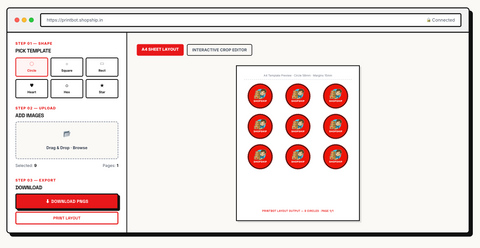
A premium layout workspace that transforms your batch of images into professional print-ready designs in minutes.

https://printbot.shopship.in ๐Ÿ”’ Connected
Step 01 โ€” Shape

Pick Template

โ—ฏ
Circle
โ–ก
Square
โ–ญ
Rect
โ™ฅ
Heart
โฌก
Hex
โ˜…
Star
Step 02 โ€” Upload

Add Images

๐Ÿ“‚ Drag & Drop ยท Browse
Selected: 9 Pages: 1
Step 03 โ€” Export

Download

A4 Sheet Layout
Interactive Crop Editor
A4 Template Preview ยท Circle 58mm ยท Margins 15mm
PrintBot Layout Output โ€” 9 Circles ยท Page 1/1
1
Choose a Shape Template

Browse 6 preset shapes on the dashboard: Circle, Square, Rectangle, Heart, Hexagon, or Star. Each preset shows exact dimensions and quantity per A4 page. Alternatively, create a Custom Size with your own dimensions, radius, and margins.

โ—ฏ Circle โ€” 58mm ยท 9/page โ–ก Square โ€” 50mm ยท 12/page โ–ญ Rectangle โ€” 90ร—65mm ยท 4/page
2
Upload Your Images

Click the upload area or drag-and-drop multiple images at once. Supports JPG, PNG, WEBP formats. A real-time counter shows image count and total pages needed. Upload as many as your license allows.

๐Ÿ†“ Demo: Up to 5 images
โœ… Licensed: Unlimited images
3
Arrange & Crop in the Editor

Switch to the Interactive Crop Editor tab. For each image, adjust Zoom Scale (1ร—โ€“3ร—), Offset X/Y to pan the image, and apply filters. Hit Auto-Fit to instantly optimise or Apply to All to copy settings across all images.

๐ŸŽž Vivid โšซ B&W ๐ŸŸค Vintage ๐ŸŒธ Soft ๐ŸŒ™ Moody
4
Preview Layout

Switch to the A4 Sheet Layout tab. The algorithm automatically packs all shapes. Use zoom controls and page counter. See exact cutting boundaries before export.

5
Export & Print

Choose Download PNGs for individual cropped images, or Print Layout for full A4 sheets with boundary cutting guides. Ready for home print or commercial shops.

6
Save to Dashboard

All designs are auto-saved to your Recent Designs dashboard. Return anytime to edit, rename, or re-export. Designs stay on your device โ€” works offline.

Why PrintBot Is Fast

Feature How It Helps You
๐Ÿš€ Batch Upload Upload 50+ images at once instead of one-by-one โ€” saves hours of manual work
โšก Smart Packing Algorithm minimizes paper waste by auto-arranging shapes on A4 โ€” no manual positioning
๐Ÿ” One-Click Apply All Copy crop/filter settings to all images simultaneously โ€” consistent look across 50 prints
๐Ÿ‘๏ธ Live Preview See your final A4 layout before printing โ€” eliminate test print waste
๐Ÿ“ Custom Sizes Go beyond presets โ€” define any shape dimensions for any project
๐Ÿ“ด Offline Access Work without internet with a valid license โ€” 30-day offline grace period

Typical Workflow Example

Creating fridge magnet sticker sheets for a product launch:

1 Choose Circle template (60mm, 12/page)
2 Upload 48 photos of your product in one drag-and-drop
3 Crop each to center the product using the interactive editor
4 Apply Vivid filter to all images in one click
5 Download PNGs or print A4 layout with boundary guides
โœ“ Result: 4 pages ร— 12 stickers = 48 ready-to-press fridge magnets
๐Ÿš€

Ready to Start?

Activate your license for unlimited images, or try the free demo with up to 5 images โ€” no login, no credit card required.

Hardware & Materials

Configure Your Setup

Select a compatible product below to customize options, quantities, and add directly to your cart.
โ–ผ
Printbot Software (Lifetime)In Stock
ShopShip

Printbot Software (Lifetime)

Rs. 1,499.00Rs. 1,999.00